
Workers' Compensation Case Management Software

E-Reports by CaseManagement.com helps independent Workers’ Comp case managers and case management agencies organize case information, prepare reports, track billable activity, coordinate with adjusters, and create invoices in one web-based platform.
Keep the documentation, communication, and billing behind each case connected—from the initial assignment through ongoing progress reporting.
Every E-Reports subscription includes unlimited users and all six report types.
Monthly subscription • Cancel anytime • No software to install
Manage the Work Behind Every Workers’ Comp Case
A Workers’ Compensation case involves more than a progress report. Case managers must document medical updates, communicate recommendations, track return-to-work status, request authorizations, and account for the services they provide.
E-Reports brings that work into an organized system. Instead of searching through separate documents and email threads, case managers and authorized collaborators can access case information and follow its progress.
Organize Cases and Find Information Faster
Create reports, assign users, and sort case records by details such as claimant, claim, date, case manager, supervisor, adjuster, and invoice number.
Prepare Consistent Client Reports
Use structured report formats and customizable templates to organize case information and maintain consistency. Review and revise reports before sharing the completed documents.
Track Services, Time, and Expenses
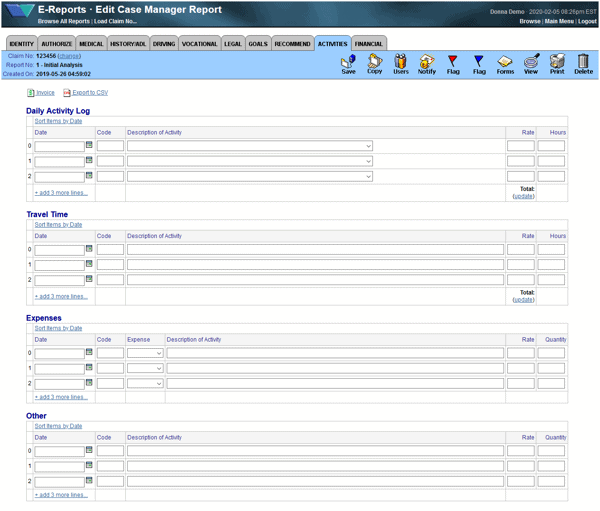
Document daily activities, case hours, travel time, and reimbursable expenses. Use recorded activity to prepare itemized invoices, with service rates managed by supervisors.
Coordinate Updates and Authorizations
Notify assigned adjusters and guests when case information changes. Adjusters can review requests and approve or deny proposed actions and treatments within the system.
Six Report Types Included in Every E-Reports Plan
Every subscription includes Standard, Customized, Comprehensive, Short, Medical, and Quick E-Bill. Use the format appropriate to the assignment, the information you need to document, and your client’s reporting requirements.
You do not need to upgrade your subscription to access a different report type.
Standard
- Case Information
- Employer data
- Medical appointments
- MMI
- PPI ratings
- RTW status
- Summary
- Adjuster Authorizations
- Notes
- Attachments
- Daily Activities log
- Quick Invoicing
Customized
- Case Information
- Employer data
- Medical appointments
- MMI
- PPI ratings
- RTW status
- Summary
- Medical status
- Vocational background
- Job availability
- Recommendations
- Adjuster Authorizations
- Notes
- Attachments
- Daily Activities log
- Quick Invoicing
Comprehensive
- Case Information
- Employer data
- Medical status
- Claimant history
- Claimant activities
- Claimant driving
- Claimant background
- Vocational background
- Job availability
- Financial Status
- Attorney/Legal barriers
- MMI
- PPI ratings
- RTW status
- Adjuster Authorizations
- Resolution Goals
- Recommendations
- Daily Activities log
- Quick Invoicing
Short
- Case Information
- Employer data
- Medical status
- Vocational background
- Job Availability
- MMI
- PPI ratings
- RTW status
- Adjuster Authorizations
- Recommendations
- Daily Activities log
- Quick Invoicing
Medical
- Case Information
- Employer data
- Medical status
- MMI
- PPI ratings
- RTW status
- Reason for medical referral
- Physician appointments
- Medical records review
- History of accident/injury
- Medical diagnosis
- Medical prognosis
- Treatment recommendations
- Work capabilities
- Other
- Adjuster Authorizations
Quick E-Bill
- Case Information
- Daily Activities log
- Quick Invoicing
Compare E-Reports Report Types
See which information and functions each report format includes—from core case details and medical status to vocational background, recommendations, activity logs, and invoicing.
This chart compares report formats, not subscription tiers. All six report types are included in every plan.
| Data | Standard | Customized | Comprehensive | Short | Medical | Quick E-Bill |
|---|---|---|---|---|---|---|
|
Case Information |
|
|
|
|
|
|
|
Employer Data |
|
|
|
|
|
|
|
Medical appointments |
|
|
|
|
|
|
|
MMI, PPI, RTW |
|
|
|
|
|
|
|
Summary |
|
|
|
|
|
|
|
Notes |
|
|
|
|
|
|
|
Attachments |
|
|
||||
|
Adjuster Authorizations |
|
|
|
|
|
|
|
Daily Activities log |
|
|
|
|
|
|
|
Quick Invoicing |
|
|
|
|
|
|
|
Medical status |
|
|
|
|
|
|
|
Job availability |
|
|
|
|
|
|
|
Vocational background |
|
|
|
|
|
|
|
Recommendations |
|
|
|
|
|
|
|
Claimant history |
|
|
|
|
|
|
|
Claimant activities |
|
|
|
|
|
|
|
Claimant driving |
|
|
|
|
|
|
|
Claimant background |
|
|
|
|
|
|
|
Financial Status |
|
|
|
|
|
|
|
Attorney/Legal barriers |
|
|
|
|
|
|
|
Resolution Goals |
|
|
|
|
|
|
Choose the report format that fits the work you need to document. The available fields and functions vary by report type.
Unlimited Users, With Access Controlled by Role


Every E-Reports subscription includes unlimited users. Give the people involved in a case the appropriate access while maintaining control over who can view and manage its information.
Case managers document case progress, prepare reports, record activities, and communicate recommendations.
Supervisors assign and reassign cases, oversee reports, establish billing rates, and invoice clients.
Adjusters and payers review case information and respond to authorization requests.
Invited guests receive view-only access. Depending on the case, guests may include employers, patients, attorneys, or other authorized participants.
Unlimited users does not mean unrestricted access. Supervisors and case managers control access to individual cases.
Monthly subscription • Cancel anytime • No software to install


From Case Information to a Reviewed Report and Invoice
- Set up the case. Enter the core claim, claimant, employer, and client information.
- Document the work. Add updates, recommendations, and relevant case activity using the appropriate report format.
- Prepare and review the report. Reuse existing information, complete the current report, and make revisions before delivery.
- Prepare the invoice. Use recorded billable activity to create an itemized invoice and review the details.
- Share updates and continue the case. Notify authorized participants and maintain current information as the case progresses.
Support for Independent Case Managers and Agencies
For Independent Workers’ Comp Case Managers
Bring reporting, activity tracking, client communication, and billing into a consistent daily process. E-Reports helps you manage the administrative work that accompanies your caseload.
For Workers’ Comp Case Management Agencies
Give case managers a shared reporting structure and supervisors the tools to assign work, oversee cases, manage rates, and coordinate client delivery.

Web-Based Access Without Software Maintenance
Access E-Reports through your browser without installing or maintaining desktop software. The platform includes encrypted connections between your device and the server, automated daily backups, and ongoing system updates.
Print or save reports when you need a document copy, and email or print invoices for client delivery.
Choose Your Plan. Keep Every Report Type.

E-Reports offers Solo, Team, Agency, and Agency Max subscriptions with different report allowances.
Every plan includes unlimited users and all six report types. Choose the report allowance that fits your operation while retaining access to the full selection of formats.
Subscriptions renew monthly and can be canceled anytime.
Frequently Asked Questions
E-Reports is designed for independent Workers’ Compensation case managers and case management agencies that need to organize case documentation, reporting, activity tracking, payer communication, and invoicing.
Yes. Every E-Reports plan includes Standard, Customized, Comprehensive, Short, Medical, and Quick E-Bill. Report formats differ in their fields and functions, but access to the six types is included in every plan.
Yes. Every subscription includes unlimited users. Case access remains controlled through assignments and user roles. Each plan has its own report allowance.
Yes. Reports and invoices can be reviewed and corrected before delivery so you can check the information before sharing it with clients.
Email from one domain to another is usually not encrypted in transit. Even though access to your email is secure from your computer to the server, it is NOT encrypted in transit when the receiver is using a different email platform or service. Many people have been misinformed about this fact.
In addition, typical IT personnel and hackers can reroute, misdirect and copy email to unauthorized parties. The only protection against abuse and critical mistakes is keeping the information on a secure platform like CaseManagement.com E-Reports.
Yes! CaseManagement.com runs on the cloud with dedicated CPU and fast Solid State disk (SSD) drives connected to the Net via fiber optics. We have a 99.9% up-time guarantee and the site is monitored automatically. Data is backed up daily.
Yes! You can use your computer or phone to dictate into the report. With a phone, select the microphone icon. With a Windows computer, simply press the Windows key + H. I have dictated the answer for this question!
Yes, you can enter and edit rates, minutes, and hours for all types of work. The eBill contains sections for travel time and reimbursable expenses as well. And it all subtotals and totals automatically.
It depends on the role. When you’re a Supervisor, nobody can see your reports until you assign someone as a Case Manager. Then the Case Manager can only see and work on the case report you’ve assigned to them. As a Supervisor, you can assign different Case Managers to different cases and the Case Manager will only be able to access their own assignments.
Supervisors and Case Managers can assign an Adjuster to view a report or authorize an action. This is optional.
Supervisors and Case Managers can authorize a Guest to view a report. This makes it convenient for Supervisors and Case Managers to allow access for patients, employers and attorneys that need progress reports.
If you’re just starting out as an independent case manager, the E-Reports will help you get the information you need quickly to get patients to maximum medical improvement (MMI) and return to work (RTW) which is the primary goal of case management.
As you close cases and please clients, you’ll be able to handle more referrals. As your business grows, you’ll be able to assign some of your cases to other Case Managers and make more money by closing more cases.
See E-Reports With a Real Workers’ Comp Case
Bring a current case and your reporting requirements. During a 30-day live case pilot, explore how E-Reports fits the way you document progress, communicate with clients, and prepare invoices.